Our approach: This article is based on published product information and use-case analysis. We have not conducted hands-on testing for this article.
TechGearPilot may earn a commission from qualifying purchases made through links on the site, at no extra cost to you. How our links work.
The A2148 can be useful for a mixed charging kit, but its 120W total is not 120W to one laptop. Compare current models and verify seller support before buying older stock.
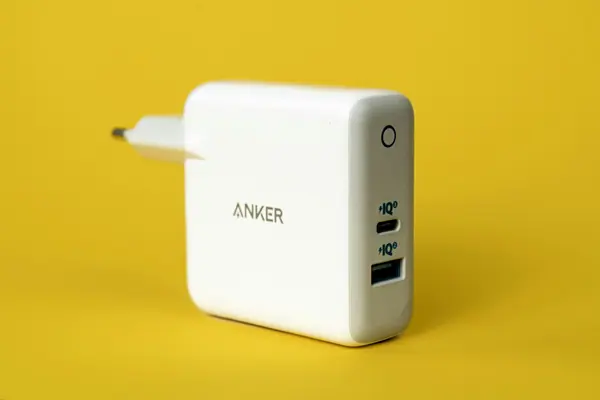
The Anker 737 GaNPrime 120W is a good illustration of why charger names need decoding. Its total rating looks stronger than a 100W adapter, yet either USB-C connection is limited to 100W on its own. There is also a significant difference between using the upper and lower USB-C ports when a USB-A device is connected.
This evaluation covers model A2148, the wall charger. It does not cover the Anker 737 Power Bank. It is a research-based assessment of the official manual and compatibility implications, without hands-on charging, temperature, or durability measurements.
At our source check, the old US A2148 store address redirected to Anker’s general charger catalog. The support documentation remained accessible. Treat this as guidance for an existing owner or someone considering older inventory, and verify the actual seller, model number, condition, and support before buying.
Product overview and quick verdict
The case for the 737 is convenience: two USB-C devices and one USB-A accessory can share an outlet. For a traveler who wants to charge a notebook, phone, and small accessory overnight, the layout is potentially useful. For a person who expects a single device to take the whole headline wattage, it is the wrong product.
The more important question today is whether this particular older model has an advantage over current alternatives at the price offered. Do not pay extra merely because “120W” is larger than “100W.” The port allocation and your device’s accepted input determine the practical outcome.
Key specifications
| Item | Manufacturer specification |
|---|---|
| Model | A2148, Anker 737 Charger, GaNPrime 120W |
| Connections | Two USB-C ports and one USB-A port |
| Maximum total | 120W |
| One USB-C port | Up to 100W |
| USB-A alone | Up to 22.5W with a compatible device |
| USB-C2 plus USB-A | 24W combined maximum |
| Input | 100–240V, 50–60Hz |
| US plug | Folding prongs |
The official A2148 support page is the source of these specifications. Ratings are ceilings for documented configurations, not promises that every device will draw those amounts.
Design and build: evaluate the installation, too
The US version’s folding plug is useful for packing: it avoids exposed prongs pressing into other items in a bag. The two USB-C connections allow a modern laptop and phone to connect without converting a USB-A cable. Keeping one USB-A connection may also save replacing a working lead for an older accessory.
Those design advantages have limits. A wall-mounted block places its weight and cable tension directly at the outlet. Before deciding it belongs behind a nightstand, consider cable clearance and how readily you can reach the ports. A desktop charger with an AC cord may be a better arrangement when the wall outlet is low or difficult to access.
We cannot establish how firmly a particular unit sits in your outlet or how its finish holds up from specifications. For older stock, inspection matters: verify the plug type and label, check for damage, and avoid treating a sealed box as proof that the seller will provide the same support as an authorized current listing.
Features: what GaNPrime adds to the decision
Anker identifies PowerIQ 4.0 and PPS support in the A2148 documentation. These describe charging management and compatibility features; they do not remove the need to compare the exact phone or computer with the available output profiles.
The GaN label describes part of the adapter’s power-conversion design. It should not be read as a universal fast-charge badge. Our GaN charging explainer separates that technology from USB Power Delivery, which governs how compatible devices request power.
For a buying decision, give more weight to whether the ports serve your daily routine than to a branded technology name. There is little reason to upgrade a reliable existing adapter if the only additional benefit is terminology you will not notice in use.
Performance analysis from the published limits
One laptop at a time
A USB-C notebook with a suitable input profile can use the charger within the single-port limit. A machine that needs more than that for its intended workload may charge slowly, use its battery during demanding work, or require its original power supply for full functionality. Those are possibilities dependent on the computer, not measurements of this charger.
Apple’s guidance recommends checking the adapter requirement for the exact Mac and using adequate wattage for the best experience. It also explains how to view connected-adapter power in System Information. That is more useful than assuming all MacBooks need the same supply. See Apple’s compatibility guidance.
A laptop and a phone
With both USB-C ports in use, the relevant figure is the shared budget, followed by what each device negotiates. Do not expect both connections to operate at their individual maxima together. For a work session, put the laptop’s charging requirement ahead of a phone that could finish later.
If you normally plug everything in after dinner and leave it overnight, sharing may be a minor compromise. If you have twenty minutes between meetings, sequentially giving one device more available power may be the better routine.
The lower-port trap
The USB-C2 and USB-A pairing has a much smaller shared limit than a configuration using USB-C1. This makes port choice consequential. An owner whose notebook charges unexpectedly slowly should first check where the cable is connected rather than immediately replace the charger.
Labeling a laptop cable or keeping it in the upper port can reduce confusion in a shared household. It also makes a charging setup more repeatable when several people use it.
Ease of use and compatibility
For ordinary charging, the routine is simple: use the correct cable, choose the intended port, and connect a compatible device. The complexity appears when multiple devices share the adapter or when a phone requires a specific fast-charging implementation.
A USB-C port is not a complete compatibility statement. Confirm that the device accepts USB Power Delivery, check any PPS requirement, and use an appropriately rated cable. For an accessory whose maker specifies a particular adapter, follow that guidance before substituting a multiport model.
The USB Power Delivery guide explains why a high-capacity adapter does not force its entire output into a smaller device. For a practical shopping worksheet, see how to choose a USB-C charger.
Pros and cons
Reasons to consider it: useful mixed connections, enough total headroom for certain multi-device routines, documented output profiles, and a folding US plug. Existing owners may discover they already have enough capability once they use the ports appropriately.
Reasons to hesitate: a single-port ceiling below the headline total, a restrictive lower-port pairing, older-model availability, and no independently measured performance in this evaluation. A discount is meaningful only after the model and seller meet your requirements.
Price and value
We do not publish a fixed current street price for this model because availability and seller conditions vary. Compare the complete offer with a current product: the same plug region, necessary cables, return period, and applicable warranty. If the savings are small, clearer availability and support on a current model may be worth more than extra nominal total capacity.
For an existing owner, the calculation is different. If your devices charge reliably and the port layout works, replacing it adds cost without necessarily changing anything important. Make an upgrade solve a named limitation: a higher single-port requirement, too few USB-C connections, or an inconvenient physical setup.
Who it suits, who should skip it, and alternatives
The 737 suits an existing owner organizing a modest laptop-and-phone kit, or a careful buyer who finds the correct model from a trustworthy seller at a compelling price. Skip it when you need a documented higher single-device output or cannot verify the offer.
Consider the newer Anker Prime 100W A2688 for a currently listed mixed-port alternative, while checking its own sharing limits. Consider the UGREEN Nexode 65W when your needs are lower and a compact shared kit is the priority. Our charger buying guide puts both into context.
Final summary
The A2148 is most understandable as a shared-power charger with important port rules. Its number is not misleading once read correctly, but it is easy to use that number incorrectly. Start with the device and charging routine, verify the port combination, and compare a real offer against current alternatives. That process is more reliable than choosing by a brand name or a larger wattage alone.
Reader questions
Is this the Anker 737 power bank?
No. This article covers the A2148 GaNPrime 120W wall charger. The Anker 737 Power Bank is a different battery-powered product with different specifications.
Can it deliver 120W to one laptop?
No. Anker specifies a maximum of 100W from either USB-C port used alone. The 120W rating describes the charger's total output budget.
Which port should a laptop use when USB-A is occupied?
Use the upper USB-C1 port. Anker lists only 24W combined for the USB-C2 plus USB-A pair, compared with a much larger budget for combinations that include USB-C1.
Compare before you choose
Check the exact model, compatibility and current availability with the manufacturer before purchasing.
These links go to manufacturer information. No affiliate commission is active on these product links. Our link policy.
Anker 737 Charger GaNPrime 120W (A2148)
Best fit: Evaluating an existing A2148 charger
- Two USB-C ports and one USB-A port
- Up to 120W combined output
- Up to 100W to one USB-C device
The tradeoff: Legacy model: the linked official page provides documentation, not confirmed retail availability
View manufacturer details Product record checked 2026-09-18. Confirm current specifications.Sources & further reading
Product information checked September 18, 2026. Specifications and availability can change.